A little background
Fraud is... a bit annoying.
"HM Revenue & Customs (HMRC) estimates that tax evasion cost the UK £5.5 billion in 2022-23" — Uk Parliament
Given that in the 2021 census the working age population of England and Wales was 37.5 million, it means that tax fraud has stolen from you, personally, £146.67. That doesn't sound like much I know in the grand scheme of things but, it's money that could pay for schools, healthcare and roads.
The deeper problem it has however is that it has a huge chilling effect on the economy. If businesses go bust because of fraud then honest, hardworking people lose their jobs too. Also, if fraud is prominent then there might not be businesses willing to take the risk to replace them.
But, the problem is that fraud isn't as obvious as some other things.

A couple of different examples of different types of fraud that aren't the easiest to spot are:
Phoenixing
Companies closing and reopening anew to avoid paying taxes and to move assets, same company, new name, no debts.
Advance Fee Fraud
Companies get paid upfront for goods, those goods never arrive and the company disappears. But opens next week with a new name.
Pension Liberation Fraud
A company pops up offering people early access to their pension funds, created with a "nominee arrangement". This is basically someone who is paid to sign the papers but doesn't know the detail of what's going on. When regulators act there is nobody with knowledge to question so victims lose out on retirement savings.
Invoice Factoring Fraud
Sometimes companies don't want to wait 30-90 days to get an invoice paid, so other companies will buy the invoice to collect later in exchange for a percent. Nefarious companies might use similar sounding subsidiary names to sell the same invoice many times over. The accounts look clean right up until all the businesses go to collect at the same time.
So, how do we tackle this?
Some of the patterns here we could capture in terms of a good algorithm that works purely on the data, looking at the dates of incorporation, exact matches based on director names. But one of the big problems is that a lot of this data is fuzzy, and require serious contextual reasoning across a large set of signals simultaneously. A single company being incorporated isn't suspicious, but a company closing and then another opening in the same area with the same amount of starting capital in one as lost assets in another is.
So, what we're going to build is a system that will:
- Take a company number as a starting point
- Fetch the company's profile, directors, and persons of significant control from Companies House
- Autonomously traverse the related entity graph of directors, PSC chains, and connected companies via the Companies House REST API, orchestrated by a LangGraph investigation loop
- Detect fraud patterns using LiteLLM, with model routing matched to investigation complexity and human-editable detection playbooks
- Use Qdrant for semantic similarity matching over filing text and as a traversal cache to avoid redundant API calls
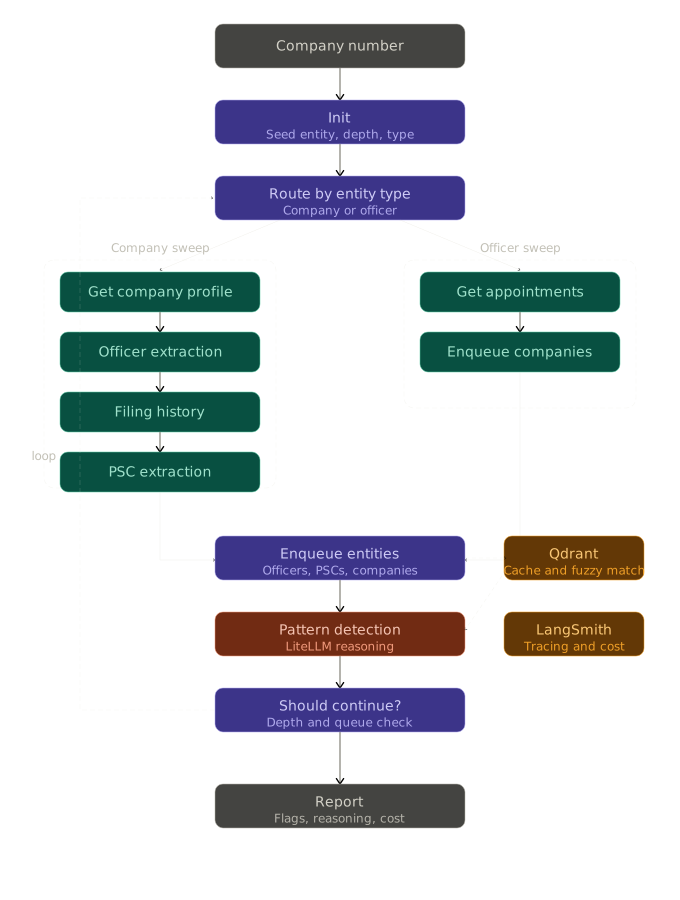
A rules-based approach to this problem has a fundamental tension: strict rules miss too much, loose rules flag everything. The interesting engineering challenge is building something in between. A system that can reason about combinations of signals, explain what it found and why it matters and do so at a cost and speed that makes it useful in practice. Here is how this architecture addresses that:
Reasoning transparency
Rather than a confidence score with no explanation, the LLM produces a reasoning trail. Not just "this looks suspicious" but "this company was incorporated 18 days after a connected entity dissolved, shares two directors, and operates from the same address which is consistent with phoenixing." That is something a human investigator can act on.
Cost transparency
Every LLM call, API request, and traversal step is traced end-to-end in LangSmith, giving full cost attribution per investigation. You can see exactly what an investigation cost and where that cost was incurred.
Targeted traversal
A naive fanout over a company network explodes quickly and produces noise. Signals from early in the investigation steer what gets followed up, so the graph expands where it is interesting and stops where it is not.
Model flexibility
Not every detection task needs the same model. Semantic similarity matching over filing text is cheap but reasoning about a director network across a dozen connected entities isn't. LiteLLM lets us route each task to the right model for that job and keep costs proportionate to complexity.
Human-in-the-loop gates
Some steps are expensive to run, some require domain knowledge the system does not have, and sometimes an investigator already knows something that should steer the traversal. The architecture supports explicit pause points where a human can review findings and direct what happens next.
Fault isolation
The graph structure means a failed node does not have to terminate an investigation. A bad API response or a model timeout can be logged, skipped, or marked for retry without losing the work already done.
Talking to Companies House
Before we can do anything fun, we need to get the public data that's just out there floating around.
Companies house has a free public API that anybody can call, you just need an API key that you get when you create a free account here. Once you have an api key you can drop it in a .env file and load it either with dot_env or something else.
class CompaniesHouseClient:
  def __init__(self, api_key: str):
    self.client = httpx.AsyncClient(
      base_url="https://api.company-information.service.gov.uk",
      auth=(api_key, ""),
    )
Fortunately, even though it is a government API the documentation is fantastic. (Hats off to the devs over there, you've done an amazing job). There are a few different entities that we're interested in, these are:
- The profile of the company
- Officers of the company
- Appointments of the officers
- Persons of significant control of the companies
- Filing histories of the company
And those entities all relate to one another in different ways, either directly or indirectly
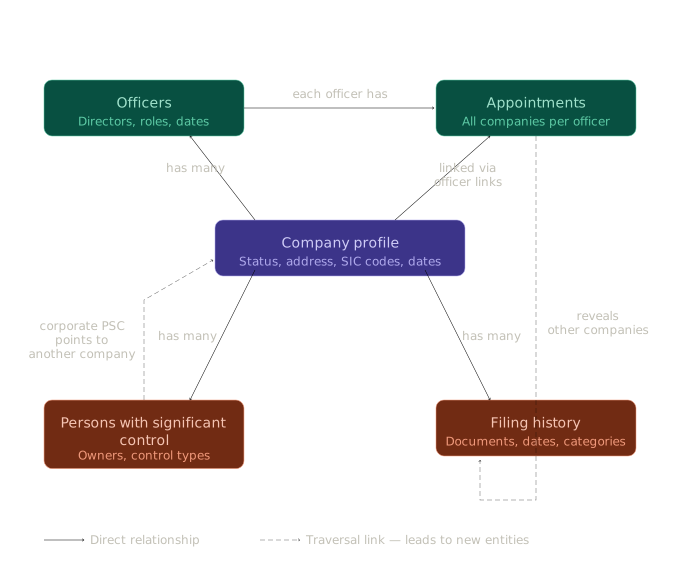
So we create the entities that we need as pydantic python classes, the reason for this is that then we can validate them as they come back when we deserialize them from the response:
class CompanyFiling(BaseModel):
  date: datetime | None = None
  category: enums.CompanyFilingCategory | None = None
  description: str | None = None
  type: str | None = None
  subcategory: str | None = None

  #...

  async def GetCompanyFilingHistory(self, company_number: str) -> models.CompanyFilingHistory:
    """Fetch the filing history for a company.
    Returns filed document categories, types, and dates. Useful for
    detecting timeline irregularities such as overdue accounts, dissolution
    filings, and gazette notices."""
    res = await self._get(f"/company/{company_number}/filing-history")
    res.raise_for_status()
    return models.CompanyFilingHistory.model_validate(res.json())
So, we've got an API client all set up. But nothing really calls it yet, this orchestrator is where LangGraph comes in.
Making the Graph
While LangGraph's website uses a lot of verbose and "Web-3.0" sounding terminology such as "agentic orchestration framework for reliable AI agents using directed acyclic graphs". The truth of the matter is that this tool is a whole lot more simple than the site makes it out to be.
There are really only three terms that you need to be familiar with to get a base level understanding of LangGraph and none of them have anything to do with AI:
- Nodes - These are the main workhorse of LangGraph, they're really just python functions. You take in a state object, you do some work, you modify the state, you return.
- Edges - These are the things that wire the nodes together, you say that node A is going to go to B. Where this gets interesting is that you can conditionally route to different nodes depending on conditions within the state
- Graphs (DAG's) - When you have all your nodes wired together with edges, you bake it all into a DAG (Directed Acyclic Graph) which is basically your control flow from input to output passing through the nodes
Effectively, it's a bit of an amalgamation of Step functions from AWS if you're familiar with those, some aspects of functional programming and a dash of the Actor model if you're familiar with that too. Truly, there is nothing new under the sun. Even the concepts of durability, human in the loop and memory/state management are effectively holdovers from those types of systems too.
State
The best place to start with LangGraph is the state. This is a singular python class that is going to be passed through our nodes and transformed, you want this to be comprehensive about your entire application but also flatly structured for reasons that we'll get into later around partial updates using reducers (Which may be familiar from Redux).
import operator
from typing import TypedDict, Annotated
from deepdue import models
from pydantic import BaseModel, Field
from deepdue.enums import InvestigationEntityType

class InvestigationState(TypedDict):
    target_company_number: str

    current_entity_id: str
    current_entity_type: InvestigationEntityType

    companies: Annotated[dict[str, models.CompanyProfile], operator.or_]
    officers: Annotated[dict[str, models.CompanyOfficers], operator.or_]
    appointments: Annotated[dict[str, models.OfficerAppointments], operator.or_]
    pscs: Annotated[dict[str, models.CompanyPSCs], operator.or_]
    psc_statements: Annotated[dict[str, models.CompanyPSCStatements], operator.or_]
    filing_histories: Annotated[dict[str, models.CompanyFilingHistory], operator.or_]

    entities_to_investigate: Annotated[list[models.InvestigationEntity], operator.add]
    entities_visited: Annotated[list[models.InvestigationEntity], operator.add]
    max_depth: int

    flags: Annotated[list[str], operator.add]
    report: str | None
This looks a whole lot more complicated than it is, but it's not that bad. I promise.
It's a class that's just a big typed dictionary, we've got the input target_company_number and then the current_entity variables. These are going to point to whatever we want to in the current cycle and the type is going to tell us what we're pointing at so we know how to handle it. Then we've just got a big list of companies, histories, etc. Then we have the list of all the entities we have visited, and everything that we need to visit to investigate. Finally we've got the max_depth which says how far the traversal should go, the flags which is part of our output and the report.
We'll unpack those entities now from the innermost part to the outermost in order:
dict[str, models.CompanyProfile]- We've got a dictionary that is keyed on a string and the value is the entity, for companies this would be the company number. But, for other entities like the officers it'll likely be the appointment link as that uniquely identifies them.Annotated[X, operator.or_]- Here what we're doing is strapping the.or_function from python to this dictionary. This uses the python merge dictionary syntax of|where the right-most key wins when doing the merge, which means we can update the dictionary by just doing a return
The reducer pattern sounds complicated, but what it means is that instead of doing this:
company_profile = await client.GetCompanyProfile(company_number)

existing_companies = state["companies"] or {}
updated_companies = {**existing_companies, company_number: company_profile}

return {"companies": updated_companies}
Where we need to manage and update the state ourselves reading in and out the changes, we can just do:
return {"companies": {company_number: company_profile}}Nodes
Now that we've got some state to modify, let's write some code to modify the state.
Every single node in LangGraph is just a python function, no decorator, no special syntax. That's it. The only requirement is that you take the state object that we defined in the previous step as a parameter.
There is however one small gotcha, if we want to do dependency injection we have to capture those dependencies with a closure and return that which effectively does bring back a loose concept of a decorator. We need to do that here because we want one client defined at the top level which every node will reuse:
def make_company_lookup_node(client: CompaniesHouseClient):
  async def node(state: InvestigationState):
      company_number = state["current_entity_id"]

      company_profile = await client.GetCompanyProfile(company_number)

      return {"companies": {company_number: company_profile}}

  return node
That's it. Yeah, that's the whole thing.
Setting up the graph and edges
What we want to do now is to wire those nodes together into some sequence that modifies the state in a way that is useful to what we want to do. We do this by creating a StateGraph object.
builder = StateGraph(InvestigationState, input=InputState)The input here is just decoration for langgraph later, but we effectively add nodes to the graph by stating their name first and then declaring the function that the name corresponds to:
builder.add_node("get_company", company_lookup_node)With the graph object setup, and the nodes defined we need to connect the nodes in sequence. The way that we define an edge is to use the add_edge function supplying the "from, to" of the names of the defined nodes:
builder.add_edge("get_company", "officer_extraction")There are two very special nodes however, these are the start and end nodes. They're imported directly from the LangGraph library and they state where the execution starts and ends.
from langgraph.graph import StateGraph, START, END
# ...
builder.add_edge(START, "init")
builder.add_node("init", init.node)
builder.add_edge("init", "route_extraction_by_type")
# ...
builder.add_edge("should_continue", END)
Conditional routing
As it stands, we have a list of functions that execute in sequence. Not super useful and doesn't really justify bringing in the library but where this starts to change is conditional routing:
builder.add_conditional_edges(
  "enqueue_company",
  should_continue_node,
  {
      "dequeue_next":"dequeue_next",
      "end": END
  }
)
There are three key bits of this, but one of them is optional:
- The name of the node that the connection is coming from
- The node that will be doing the conditional routing
- Optional: the dictionary of strings that map the names to the routes from the node. You don't need this but it helps with LangSmith studio visualization later.
Inside of the node, we do some conditions based on state and return one of the two strings that we want to route to:
def node(state: InvestigationState):
  # ...

  if remaining:
      return "dequeue_next"

  return "end"
So now we've got our nodes defined, with behaviour, state, and conditionally doing different jobs to give us some output. But what we would really like is some observability and debugging help...
Setting up LangSmith
Getting LangSmith setup is also pretty simple fortunately. We just signup for a new account, make a project and create an API key. Then, we drop it into the .env file and make sure it's loaded in as an environment variable.
CH_API_KEY=YOUR-KEY-HERE

LANGSMITH_TRACING=true
LANGSMITH_ENDPOINT=https://api.smith.langchain.com
LANGSMITH_API_KEY=YOUR-KEY-HERE
LANGSMITH_PROJECT="deepdue"
You will also need to add a langgraph.json file at the top of your project, this basically points to the function that builds your graph. If you have injected dependencies you will need to provide a version with zero arguments but you can do this by just wrapping the call and giving the defaults.
{
  "dependencies": ["."],
  "graphs": {
    "investigation": "src/deepdue/agent/graph.py:create_graph"
  },
  "env": ".env"
}
Once you have this wired in you get two fantastic things out of the box, the first of which is LangGraph studio
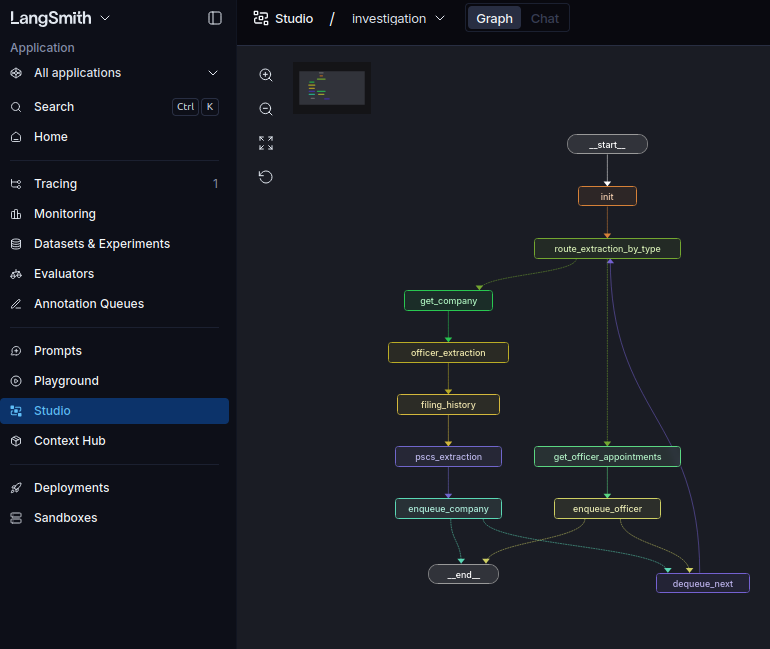
This can truly be invaluable later on, because your flows and the orchestration can get very complex so sometimes having a high level view will give you the visibility you need to wire things together properly, also it helps with debugging as it will show you compilation errors for the graph.
The other great thing that we get is traces:
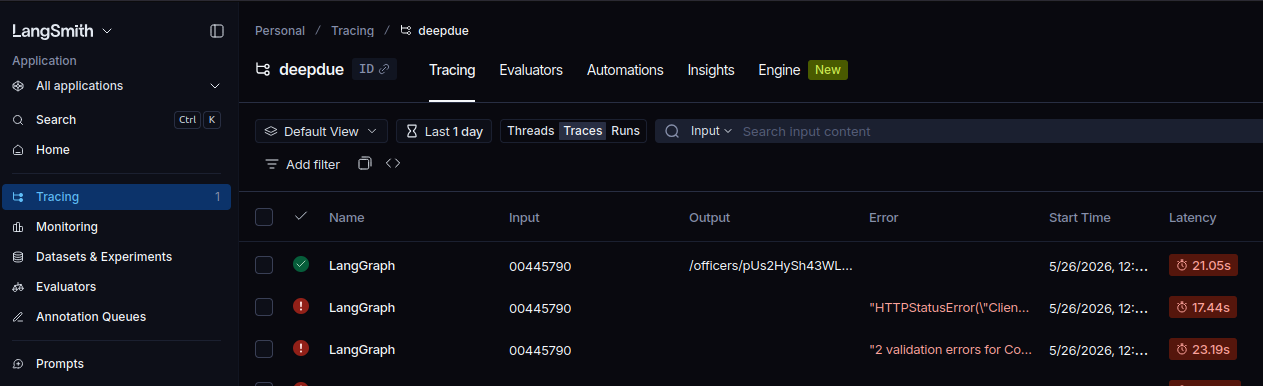
This gives you really nice detailed breakdown of what ran, how long it took, where the slow parts were, what it returned and how much it cost to run! All incredibly valuable. Our cost to run right now is zero because we're not using LLM's yet, but that will come.
Simple Serving
LangGraph is great, but nobody who wants to actively use this project is going to sit and install python. So we need some serving framework so that we can put this on a server somewhere.
The easiest way to do this is with a simple pyproject.toml and using FastAPI to host the whole thing, let's get that set up now.
Setting up the project
As we said before, we're using pyproject.toml for this because in development as well it means that we can do the editable install and use the [project.scripts] as well which is super useful.
[project]
name = "deepdue"
version = "0.1.0"
requires-python = ">=3.10"

dependencies = [
    "httpx",
    "python-dotenv",
    "pytest",
    "pydantic",
    "langgraph",
    "fastapi[standard]",
    "pydantic-settings",
    "langsmith"
]

[project.optional-dependencies]
dev = [
  "langgraph-cli[inmem]",
]

[tool.setuptools.packages.find]
where = ["src", "."]
include = ["deepdue*"]

[project.scripts]
dev = "deepdue.serve.api:main"
The only extra dependency we have for dev is the langgraph-cli which allows us to view the studio version of the graph which helps when debugging. We also have the project script that calls into api:main to start the server.
Simple FastAPI
Then it's just a case of setting up a simple FastAPI app, giving it some defaults and plugging in some routers that we've defined elsewhere. We don't need to do this but the separation of concerns here is nice.
app = FastAPI(
    title="DeepDue",
    description="Agentic UK corporate fraud investigator built on the Companies House public API.",
    version="1.0.0",
    docs_url="/docs",
    lifespan=lifespan,
)

app.include_router(health_router)
app.include_router(home_router)
app.include_router(investigation_router)

app.add_middleware(log.RequestIdMiddleware)

def main() -> None:
    host = os.getenv("HOST", settings.host)
    port = int(os.getenv("PORT", settings.port))
    workers = int(os.getenv("WORKERS", settings.workers))

    uvicorn.run(
        "deepdue.serve.api:app",
        host=host,
        port=port,
        workers=workers,
        log_config=None
    )
We want a nice UI to interact with for the users, we're using Jinja2 templates for this because they're simple, and pretty much industry standard for now. We don't have a ton of complexity or state that we need to manage (not in the front-end anyway).
from deepdue.serve.templates_env import templates

logger = logging.getLogger(__name__)

router = APIRouter()

@router.get("/")
async def get_predict(request: Request):
    logger.info("HIT: GET / - serving UI")
    return templates.TemplateResponse(request, "index.html")
Those templates are just defined in a templates_env file we have so that we don't need to redefine the templates object over and over. It means as well that our entire front end is just a single .html file that sits within the /templates folder.
from pathlib import Path
from fastapi.templating import Jinja2Templates

BASE_DIR = Path(__file__).resolve().parent
templates = Jinja2Templates(directory=BASE_DIR / "templates")
Finally, we need the API endpoint that the front-end is going to hit when the user submits a company number to investigate. We'll take in the pydantic class to get input validation. Do the work and then return the result.
import logging
from fastapi import APIRouter, HTTPException, Request

from deepdue.enums import InvestigationEntityType
from deepdue.serve.schema import InvestigationRequest

logger = logging.getLogger(__name__)

router = APIRouter()

@router.post("/investigation")
async def request_investigation(request: Request, payload: InvestigationRequest):
    logger.info("HIT: /investigation")

    try:
    # ...
        return result
    except Exception as e:
        raise HTTPException(
            status_code=500,
            detail=str(e),
        )
Calling the graph
We've got all the parts, and they're great separately. But, atleast for now they're still all separate.

What we need to do is to create a graph on startup of the API, and then provide that to the endpoint for it to call, we don't want to compile the graph every time because it's computationally wasteful, slow, and makes memory and durability more difficult to implement. The way in which we do this is the use of asynccontextmanager.
@asynccontextmanager
async def lifespan(app: FastAPI):
    log.configure_logging()

    os.environ["LANGSMITH_TRACING"] = settings.langsmith_tracing
    os.environ["LANGSMITH_ENDPOINT"] = settings.langsmith_endpoint
    os.environ["LANGSMITH_API_KEY"] = settings.langsmith_api_key
    os.environ["LANGSMITH_PROJECT"] = settings.langsmith_project

    ch_client = CompaniesHouseClient(settings.ch_api_key)
    app.state.investigation_graph = graph.build_graph(ch_client)

    yield
What we are doing here is:
- Setting up the logging before we do anything so we've got some useful traces if anything else crashes
- Adding the langsmith variables into the environment variables, which is important to get langsmith to work properly
- Creating a single Companies House API client that will be used as a singleton across requests
- Building the LangGraph graph and supplying the client as the parameter
- Assigning the graph to the
app.stateso that we can fetch it on the request
Then, on the endpoint we can fetch the graph out of the app state and call it which avoids repeating graph compilation.
graph = request.app.state.investigation_graph

try:
    result = await graph.ainvoke({
        "target_company_number": payload.company_number,
        "max_depth": 1,
    })
There is one important thing here, which is that we're using .ainvoke() not the normal .invoke(). Our nodes are async because the Companies House API calls use httpx.AsyncClient, which needs an async context to make non-blocking I/O requests. This lets LangGraph run async nodes concurrently which becomes even more important as we look to parallelise in future.
Using the sync .invoke() with async nodes would force each node to run in a new event loop via asyncio.run(), blocking between each call and losing any concurrency benefit.
The first of the final reveals
So, we've got an API, we've got a front end, we have our graph traversal and our data Acquisition all together now. We can fetch all the detail that we want from the Companies House API and show it back. This looks like the following:
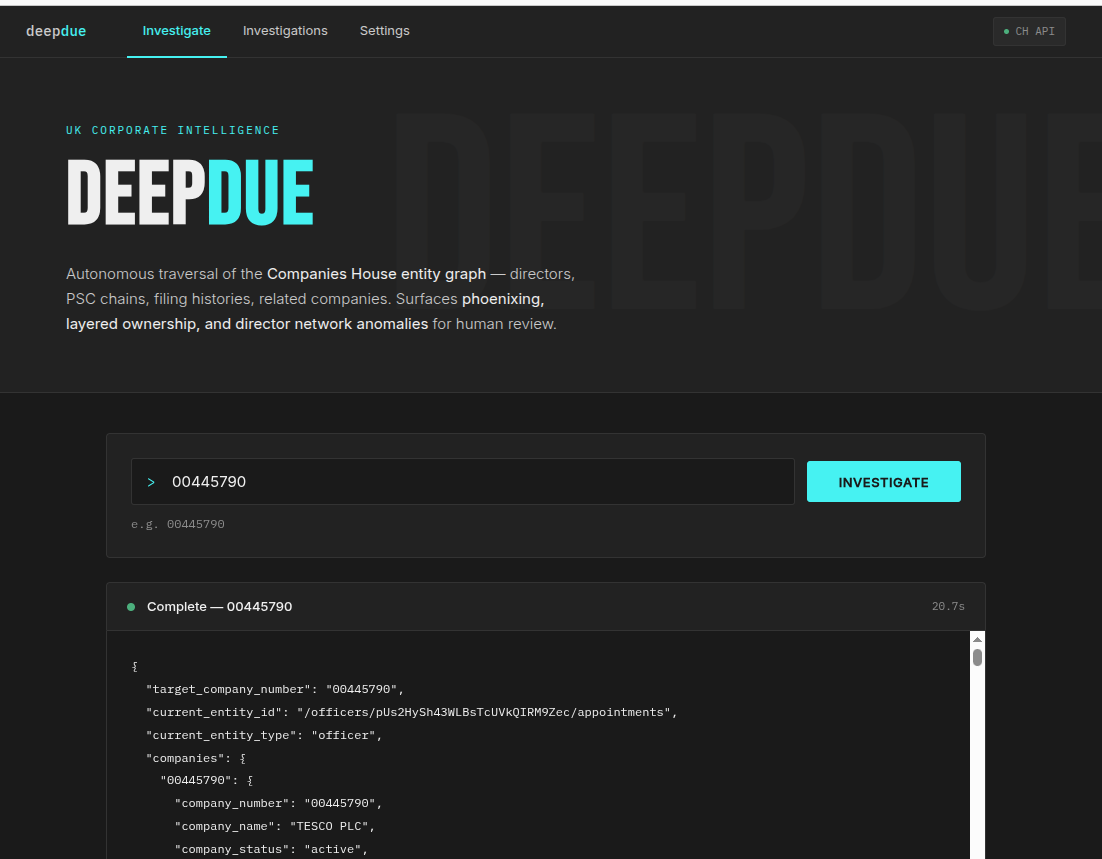
The investigation part isn't there quite yet, but we've established a really good skeleton to build on top of:
- We can dynamically fetch the data we need
- We have a simple LangGraph setup
- We've got some good debugging, logging and tracing that we'll need later
- We've got the visual editor with LangGraph studio
- We've got the serving API and UI wrapping it all together in FastAPI
Next time...
We hook in LiteLLM and start doing something actually useful with all this data we've been collecting. The traversal loop is running and state is accumulating, now we need to reason across it.
We'll build the first fraud pattern detections, route different detection tasks to the right models, and start producing findings a human investigator can actually act on.