Scratchpads to systems
Notebooks are great, they really are. You can do so much experimentation so quickly and you don't really need any setup at all, but there is one big problem with them you can't run a notebook in production.
- Working between multiple people on a single notebook is not a good experience.
- The diffs between changes are incredibly difficult to see
- We can't deploy! We can't ask a customer to download our notebook and run it...
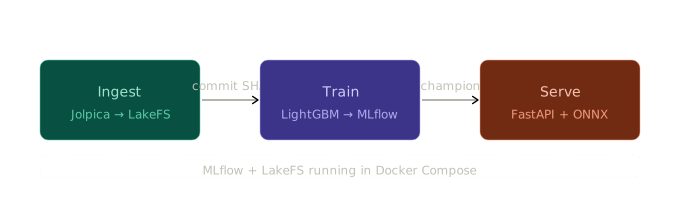
At a high level, this is the task we have at hand. We need a proper system that is going to ingest our data from some source, train a model and serve it such that end users of the system can interact with it.
Firstly though we need to define specifically what our system needs to do, and that all starts with training a model.
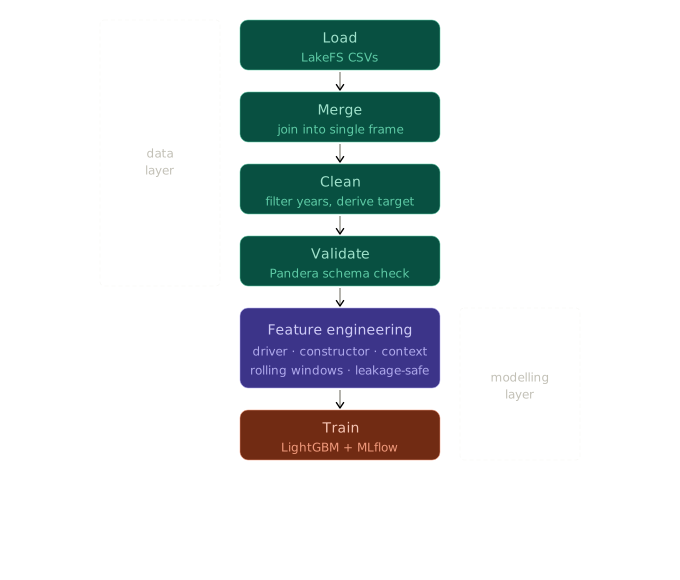
It looks quite complicated but we've actually done all of the modelling work so far, so what we are effectively doing is cutting up and systematizing our existing work. To begin we need to define a hierarchy of the system and see where things all fit together:
f1_predictor/
├── ingest/                   # Standalone data ingestion
│   ├── bootstrap.py
│   └── settings.py
├── src/f1_predictor/
│   ├── common/
│   │   └── config.py         # Shared settings via pydantic
│   │
│   ├── data/                 # Load, merge, clean, validate
│   ├── features/             # Driver, constructor, context features
│   ├── models/               # Training, evaluation, ONNX export
│   ├── pipelines/            # train_pipeline.py, eval_pipeline.py
│   └── serve/                # FastAPI app, inference, routing
│
└── pyproject.toml
This is the proposed architecture that we're going to go with. The ingest directory that sits outside of the model is going to be responsible for all of the data being pulled into our system, why? Single responsibilities. Our modelling code should only be responsibile for prediction, our serving code should only be responsible for serving. We don't want to mix responibilities because that's how we end up with a mess.
I'm going to skip over how exactly the data gets loaded in for now, I know, but trust me. It'll make sense later I promise. For now just imagine we have nice little load functions that magically give us the races, circuits, results etc dataframes.
Merging
The merging process is really simple, we just make a new file that takes in our dataframes and sticks them all together
df = pd.merge(
        left=results[["resultId", "raceId", "driverId", "constructorId", "position", "statusId", "points"]],
        right=races[["raceId", "year", "round", "circuitId", "name", "date"]],
        on="raceId")
df = pd.merge(df, drivers[["driverId", "dob", "nationality", "forename", "surname"]], on="driverId")
df = pd.merge(df, constructors[["constructorId", "name"]], on="constructorId", suffixes=("_race", "_constructor"))
df = pd.merge(df, statuses[["statusId", "status"]], on="statusId")
df = pd.merge(df, circuits[["circuitId", "location", "country"]], on="circuitId")

df["driverId"] = df["driverId"].astype("category")
df["constructorId"] = df["constructorId"].astype("category")
df["circuitId"] = df["circuitId"].astype("category")
You can see here that we're marking the id's as categorical fields, this is actually very important. If we don't do this we'll end up with a model that thinks that there is a more meaningful gap between driverid 1 and 100 than driver id's 1 and 2, telling LightGBM this means that it works on finding optimal subsets of categories rather than a scale.
Cleaning
Now that we've got a single big dataframe of all of the data that we want to train the model on, it's really important that we do a little bit of spring cleaning.
def clean_data(data: pd.DataFrame, min_year=1990, max_year: Optional[int] = None) -> pd.DataFrame:
  # Just tidying up some of the names from the merge
  data = data.rename(columns={"name_race": "race_name", "name_constructor": "constructor_name"})

  data["podiumFinish"] = (data["position"] <= 3).astype(int)

  data = data[data["year"] > min_year]
  if max_year is not None:
      data = data[data["year"] < max_year]

  # Already have the target, this doesn't give us more
  data = data.drop(columns=["position"])

  return data
We know from the EDA that we don't really have holes or other issues with the data, but we could address those here if we did. The main thing we're doing here is cutting the data from the back so we don't get anything pre-1991 because we do know that data has issues.
One thing to note here, we're actually engineering the target here as well with podiumFinish. You could make a purity argument here that it's not just doing cleaning, but the other argument would be that it's not a feature to pass to the model for training either, either way it lives here and it's fine.
Validation
"It's called garbage can, not garbage cannot." — Oscar the Grouch
Just as we determined during the notebook era, if we get garbage in we'll get garbage out. This now becomes even more important as we start to move away from static datasets, without this step if our model performance tanks on Friday at beer o'clock we'll be scratching our heads asking "But it was working yesterday? What's changed?"
Basically, what we do is pull through Pandera again and give it a validation class based on what we know about the absolute limits of the data, for example, we can't have a -1'th round of a race. It's important to note here that we're doing validation, not verification.
class F1ValidationSchema(pa.DataFrameModel):
  year: int = pa.Field(gt=1990)
  raceId: int = pa.Field(gt=0)
  resultId: int = pa.Field(gt=0)
  driverId: Category
  constructorId: Category
  circuitId: Category
  statusId: int = pa.Field(gt=0)
  round: int = pa.Field(gt=0,le=30)
  date: DateTime = pa.Field(ge=pd.Timestamp('1990-01-01'))
  dob: DateTime = pa.Field(gt=pd.Timestamp('1940-01-01'), lt=pd.Timestamp('2010-01-01'))
  nationality: str
  race_name: str
  location: str
  country: str
  status: str
  constructor_name: str
  podiumFinish: int = pa.Field(isin=[1,0])

  # Only one driver should be able to race in a single race at once
  class Config:
      unique = ["raceId", "driverId"]
The last little bit is probably the most important, we absolutely do not want more than one record for a driver for a given race. The older dataset is full of these problems where drivers are logged with DNF status codes and also other codes as well on duplicate records, so this helps prevent issues with the model.
Training
Training is largely the same as it was in the notebook, the difference of importance is that we've parameterized the model params here to pull from settings just so that we can easily change them without needing to dive into the code.
training_parameters = {
  "run_name": run_name,
  "description": f"LightGBM walk-forward training on {data['year'].min()}-{data['year'].max()} data",
  "tags": {
      "model_type": "lightgbm",
      "feature_set": features.MODEL_FEATURES,
      "data_version": f"{data['year'].min()}-{data['year'].max()}",
      "validation_strategy": "walk-forward"
  },
  "commit_sha": commit_sha,
  "model_params": {
      'n_estimators': settings.train_n_estimators,
      'learning_rate': settings.train_learning_rate,
      'num_leaves': settings.train_num_leaves,
      'min_child_samples': settings.train_min_child_samples,
      'scale_pos_weight': settings.train_scale_pos_weight,
      'subsample': settings.train_subsample,
      'colsample_bytree': settings.train_colsample_bytree,
      'objective': 'binary',
      'verbose': -1
  }
}
Other than that it's largely the same, we took optuna out for now and just use the "best" parameters that were provided as a starting point to keep the training times low while we iterate.
We do however do a full training run over the entire training set of data and export that model, it's important we do this otherwise we'll only be able to capture patterns from the size of the last training window!
def train_model_on_all_data(run_name, X, y, model_params):
  final_model = lgb.LGBMClassifier(**model_params)
  final_model.fit(X, y)
  version = export.log_model_artifacts(final_model, X, run_name)

train_model_on_all_data(run_name, X, y, model_params)
All together now
So we've got all the individual parts, now we just need something to tie it all together to get us from data to a trained model, this is where our train_pipeline.py comes in. What it does is wire together all of the bits together into a single sequence.
def train_pipeline():
  warnings.filterwarnings("error", message="Hint: Inferred schema contains integer column")

  mlflow.set_tracking_uri(settings.mlflow_tracking_uri)
  mlflow.set_experiment(settings.mlflow_experiment_name)

  raw_df = build_race_frame(
      races=data_loaders.load_races(),
      circuits=data_loaders.load_circuits(),
      constructors=data_loaders.load_constructors(),
      drivers=data_loaders.load_drivers(),
      results=data_loaders.load_results(),
      statuses=data_loaders.load_statuses()
  )

  lakefs_commit_sha = data_loaders.get_commit_sha()

  cleaned_df = clean.clean_data(raw_df, min_year=1990, max_year=2025)
  validate.check_schema(cleaned_df)

  cleaned_df = driver_features.add_driver_rolling_podium_rates(cleaned_df)
  cleaned_df = driver_features.add_driver_circuit_podium_rate(cleaned_df)
  cleaned_df = driver_features.add_driver_experience(cleaned_df)
  cleaned_df = driver_features.add_driver_age(cleaned_df)
  cleaned_df = constructor_features.add_constructor_rolling_podium_rates(cleaned_df)
  cleaned_df = constructor_features.add_constructor_dnf_rates(cleaned_df)
  cleaned_df = context_features.add_championship_position(cleaned_df)
  cleaned_df = context_features.add_season_podium_rate(cleaned_df)
  cleaned_df = context_features.add_home_race(cleaned_df)
  cleaned_df = context_features.add_circuit_type(cleaned_df)
  cleaned_df = context_features.add_regulation_era(cleaned_df)
  cleaned_df = context_features.add_grid_size(cleaned_df)

  result = train(data=cleaned_df, commit_sha=lakefs_commit_sha)
How do we trigger this? For now, a script line in our pyproject.toml makes it really easy to use, once we do an editable install we can then just call f1_train and have a model show up in MLFlow. Nice.
[project.scripts]
f1_train = "f1_predictor.pipelines.train_pipeline:train_pipeline"
So, we're done right? Not really. We've got a couple more big problems to solve (As you'll have guessed from the length of the scrollbar on this article). First up, data, data, data.
Spending time by the lake
Before we talk about the solution, let's talk about the problems.
- Can we link the data we've trained on to the model we trained?
- When we start to pull in more data, how do we keep track of it?
- Is MLFlow actually holding the dataset we trained against? I thought it was?
At the minute our setup works okay because we have a set of static CSV files, but much like in life, nothing in data stands still. We have a link to those files for now and they have a hash but we still have to actively manage those files which will quickly become a headache once we start to pull in more data, and once we dissociate the model from what it was trained on it effectively becomes useless because we can't validate any of the results.
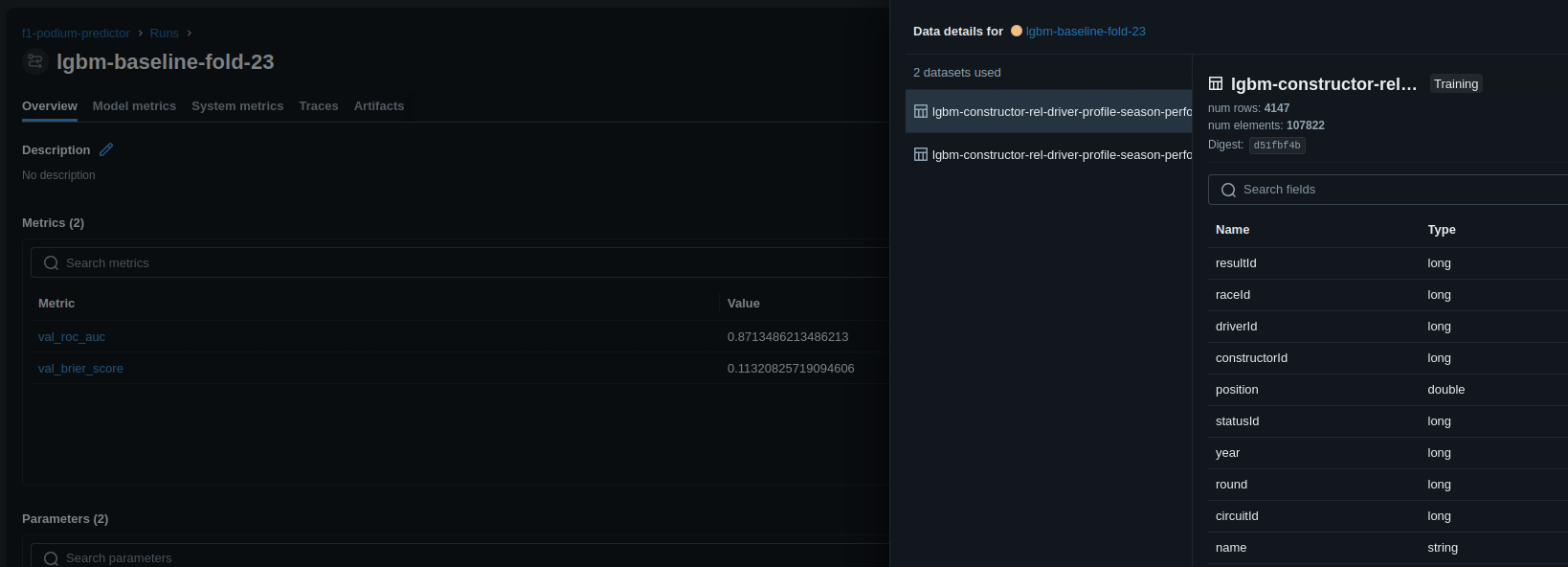
MLFlow can kind of help here, but even if you link a dataset MLFlow kind of lies to you. If you log the dataset in MLFlow, it gives you a brief overview of the schema, and maybe some metadata but it does not store the full dataset. So we're back to square one, we've got a reference to data but we still have to manage it all.
What helps us here is LakeFS.

But what is it?
Think of it as git, but for your data instead.
Setting up LakeFS
We're going to use docker compose to setup the lake, we don't really have a good option for running this without a docker image because all of the data needs to live somewhere, plus it helps managing things because we're going to have MLFlow in here soon anyway so this just helps us manage it all with a single docker compose up command instead
services:
  lakefs:
    image: treeverse/lakefs:latest
    container_name: f1-lakefs
    restart: unless-stopped
    env_file: .env
    ports:
      - "127.0.0.1:8000:8000"
    environment:
      - LAKEFS_AUTH_ENCRYPT_SECRET_KEY=${LAKEFS_AUTH_ENCRYPT_SECRET_KEY}
      - LAKEFS_INSTALLATION_USER_NAME=${LAKEFS_INSTALLATION_USER_NAME}
      - LAKEFS_INSTALLATION_ACCESS_KEY_ID=${LAKEFS_INSTALLATION_ACCESS_KEY_ID}
      - LAKEFS_INSTALLATION_SECRET_ACCESS_KEY=${LAKEFS_INSTALLATION_SECRET_ACCESS_KEY}
      - LAKEFS_DATABASE_TYPE=local
      - LAKEFS_BLOCKSTORE_TYPE=local
    volumes:
      - lakefs-data:/lakefs
    command: run
    healthcheck:
      test: ["CMD", "wget", "--spider", "-q", "http://localhost:8000/api/v1/healthcheck"]
      interval: 5s
      timeout: 5s
      retries: 10

  lakefs-setup:
    image: curlimages/curl:latest
    depends_on:
      lakefs:
        condition: service_healthy
    restart: on-failure
    entrypoint: [
      "sh", "-c",
      "curl -X POST http://f1-lakefs:8000/api/v1/setup_lakefs -H 'Content-Type: application/json' -d '{\"username\":\"${LAKEFS_INSTALLATION_USER_NAME}\",\"key\":{\"access_key_id\":\"${LAKEFS_INSTALLATION_ACCESS_KEY_ID}\",\"secret_access_key\":\"${LAKEFS_INSTALLATION_SECRET_ACCESS_KEY}\"}}' && curl -X POST http://f1-lakefs:8000/api/v1/setup_comm_prefs -H 'Content-Type: application/json' -d '{\"email\":\"admin@f1predictor.com\",\"firstName\":\"Admin\",\"lastName\":\"User\",\"companyName\":\"F1Predictor\",\"featureUpdates\":false,\"securityUpdates\":false}'"
    ]

volumes:
  lakefs-data:
We just give those keys sensible defaults in the .env file and this will handle all the setup for us. The reason that we need that separate CURL image is because by default when you setup LakeFS you can't log in until you register, so that just handles it for us in an automated way.
Okay, great! We've got a lake but no fish. Let's get our data in.
Importing our data
In future our data could come from a multitude of different sources
- Scraping the web
- Existing DB connections
- Local CSV files
But, we might as well import our CSV files into the lake first before we do anything more complicated. To do this we make a new top level package in our config that we'll call "ingest", the reason we keep it separate is that we'll likely only run this once and we don't want it being mixed with the rest of the training/serving code
import lakefs
from lakefs.client import Client
from ingest.settings import settings

def run():
    lakefsClient = Client(
        host=settings.lakefs_host,
        username=settings.lakefs_installation_access_key_id,
        password=settings.lakefs_installation_secret_access_key,
    )

    repo = lakefs.Repository("f1-race-data", client=lakefsClient).create(
        storage_namespace="local://f1-race-data",
        exist_ok=True
    )

    branch = repo.branch("main")

    local_files = [
        ("raw/circuits.csv", "data/circuits.csv"),
        ...
        ("raw/status.csv", "data/status.csv")
    ]

    try:
        with branch.transact(commit_message="Bootstrap: add raw CSV datasets") as tx:
            for (lakefs_path, local_path) in local_files:
                with open(local_path, mode="rb") as r_f:
                    tx.object(lakefs_path).upload(r_f.read())
                print(f"Staged {lakefs_path}")

        print("Transaction committed to main")

    except Exception as e:
        print(f"Transaction failed and rolled back: {e}")
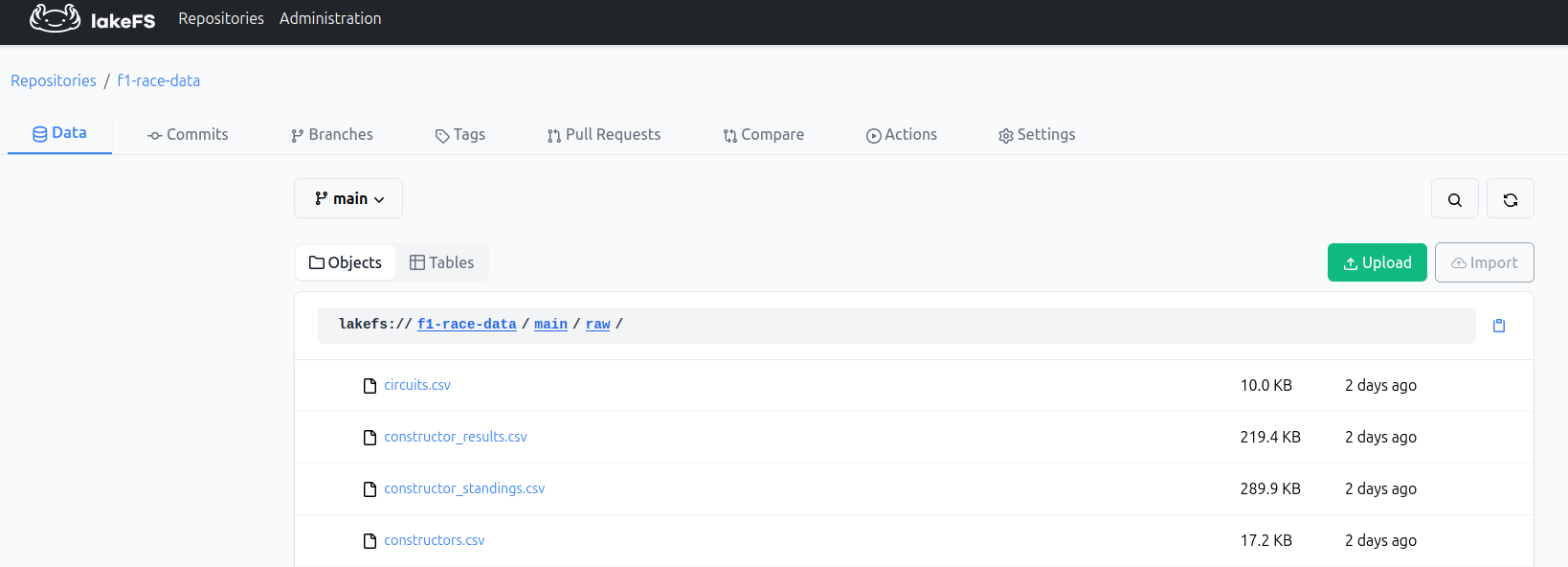
Told you it looks like Git, What we're doing is:
- Make a LakeFs client
- Create a repository
- Get the main branch from that repo
- Stage all of the local files as objects
- Do a single commit with a message
Referencing the data
Remember how I asked you to trust me about loading the data? Good news, I'm about to deliver.
_clt = Client(
    host=settings.lakefs_host,
    username=settings.lakefs_installation_access_key_id,
    password=settings.lakefs_installation_secret_access_key,
)

_branch = lakefs.Repository(settings.lakefs_repo, client=_clt).branch("main")

def get_commit_sha() -> str:
    return _branch.head.id

def _read_csv(filepath: str, **kwargs) -> pd.DataFrame:
    with _branch.object(filepath).reader(mode="rb") as f:
        return pd.read_csv(io.BytesIO(f.read()), **kwargs)

def load_races() -> pd.DataFrame:
    return _read_csv("raw/races.csv", na_values="\\N", parse_dates=["date", "quali_date"])
It's a simple bit of code, but it has a ton of advantages for us now:
- New commits to amend the data are pulled through automatically
- We also pull the commit ID so we get traceability
- Decoupled our flow entirely from *how* the system gets the data
We're likely not going to need to interact with this that much now for a while until we start pulling in race data, but having all of this set up now makes a much easier transition later on, plus it's just good practice.
Being a model citizen
Before, we had MLFlow running directly in this repository with the /mlruns and the mlflow.db checked into the repository locally, which for a solo project is fine, not great but workable. But moving forward we're going to be using a lot more capabilities of MLFlow so we should externalize that too
Fortunately because of the work that we did with LakeFS, we've got a great starting point.
Switching to Docker Compose
services:
  mlflow:
    image: ghcr.io/mlflow/mlflow:v3.12.0-full
    container_name: f1-mlflow
    restart: unless-stopped
    env_file: .env
    ports:
      - "127.0.0.1:5000:5000"
    environment:
      - MLFLOW_BACKEND_STORE_URI=sqlite:////mlflow/mlflow.db
      - MLFLOW_DEFAULT_ARTIFACT_ROOT=mlflow-artifacts:/artifacts
    volumes:
      - mlflow-data:/mlflow
    command: mlflow server --host 0.0.0.0 --port 5000 --allowed-hosts "*"
  ...
volumes:
  mlflow-data:
After adding this into the docker compose file, we've got our MLFlow server up and running. This means that now we can get a persistent setup with just docker compose up -d
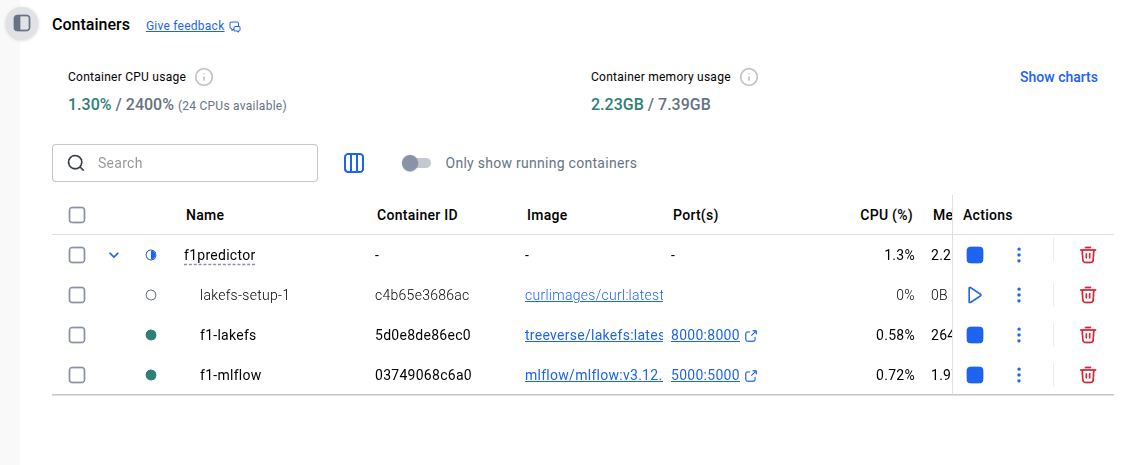
We don't even have to change any of our code because we were pointing at localhost:5000 anyway before, so it just works. This means also that if we wanted to move this to a separate server to host so that multiple people can work at the same time it's a case of simply running the docker compose command on the server and migrating the data for the first use.
The Model Registry & Aliases
Having our data be more centralized and not having the artifacts tracked in the repository were nice side effects, but actually just that. Side effects from our real purpose which was to start using the model registry.
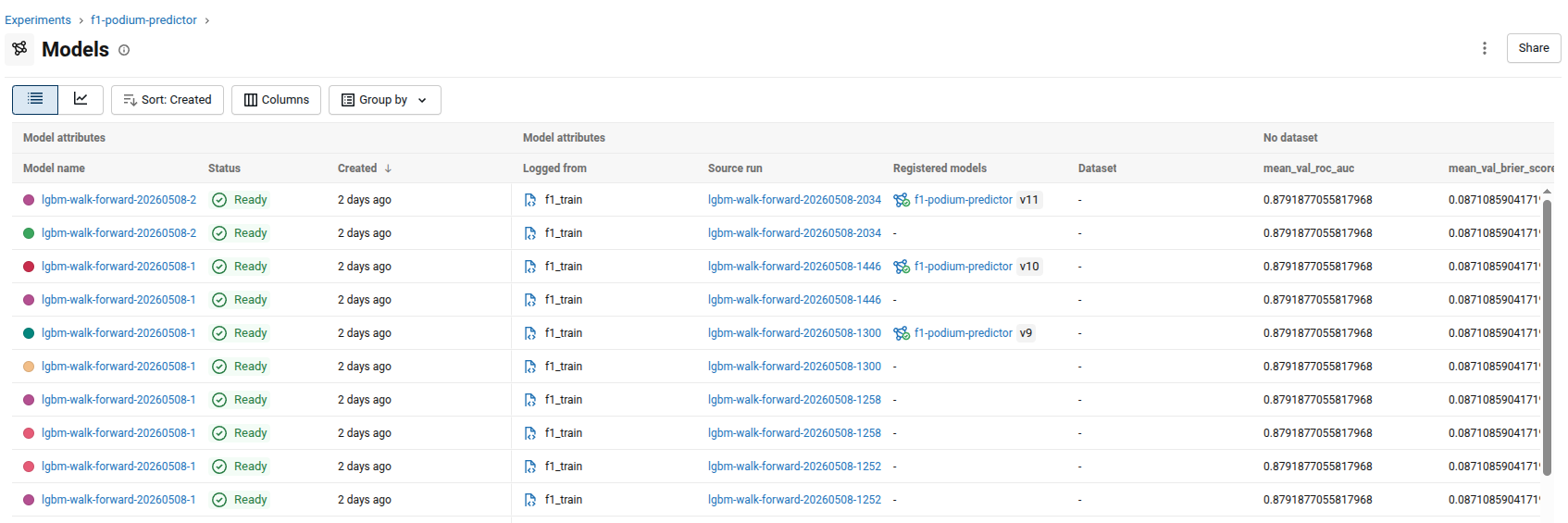
To get to this point, we need to tell MLFlow exactly what we want done and how to do it, it's a little bit of code but not to worry, we'll walk it through step by step.
def train_model_on_all_data(run_name, X, y, model_params):
    final_model = lgb.LGBMClassifier(**model_params)
    final_model.fit(X, y)

    version = export.log_model_artifacts(final_model, X, run_name)

    client = mlflow.MlflowClient()
    client.update_model_version(
        name=settings.mlflow_experiment_name,
        version=version.version,
        description=f"LightGBM walk-forward model, ONNX export. Training run: {run_name}"
    )
    client.set_model_version_tag(
        name=settings.mlflow_experiment_name,
        version=version.version,
        key="model_type",
        value="lightgbm"
    )
    client.set_model_version_tag(
        name=settings.mlflow_experiment_name,
        version=version.version,
        key="export_format",
        value="onnx"
    )

def log_model_artifacts(model, X, run_name):
  mlflow.log_params(model.get_params())

  output_sample = pd.DataFrame(
      model.predict_proba(X)[:, 1],
      columns=["podium_probability"]
  )

  with warnings.catch_warnings():
      warnings.filterwarnings("ignore", message=types.INTEGER_SCHEMA_WARNING)
      signature = infer_signature(X, output_sample)
      mlflow.lightgbm.log_model(model, name=run_name, signature=signature)

      onnx_model = convert_to_onnx(model)
      mlflow.onnx.log_model(
          onnx_model,
          name=f"{run_name}-onnx",
          signature=signature,
          registered_model_name=settings.mlflow_experiment_name
      )

      client = mlflow.MlflowClient()
      versions = client.get_latest_versions(settings.mlflow_experiment_name)
      return versions[-1]
In train_model_on_all_data right after we train the model we go into log_model_artifacts. We call log_params to record the model's hyperparameters against the run, then build an output_sample from the predicted probabilities. Those two are passed into infer_signature along with the input features, which gives MLflow the input and output schema to attach to the model in the log_model call.
We actually call log_model twice for the same model, once with the raw model and once after converting it to ONNX which we'll cover more later. But basically this is what creates those dual entries in the model list, normally this would only add it to the list of models but because we have the extra registered_model_name parameter set, it creates a new version of the model for us in the model registry too!
Finally, returning the version lets us add some extra nice tags and descriptions to the version of the model we registered after it returns. There is actually a mild concurrency issue here because if someone registers a new model version in between it won't necessarily keep the right one, but for our purposes this is fine.
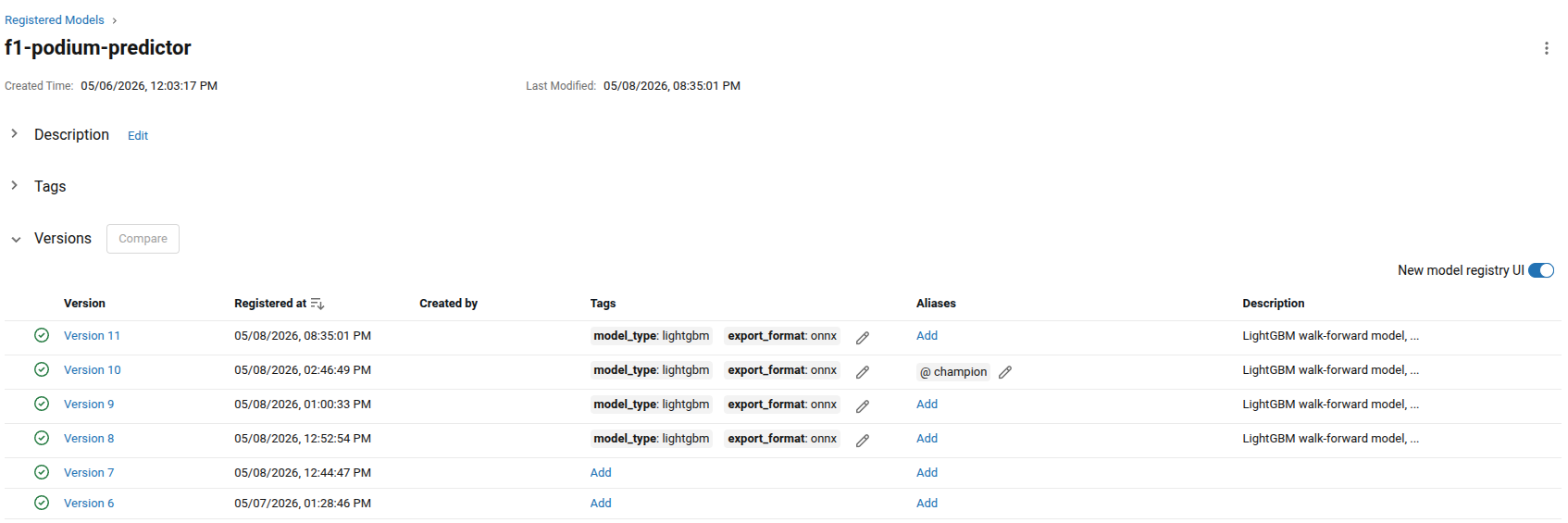
This is the final result, a list of trained ready to serve models defined by us. But what's an alias? Think of it like a moveable tag, we might have lots of different models being trained at any one time but obviously we want to control their deployment and use. What we can do is change which alias the model is assigned to, and therefore when we fetch the model by the tag, we change which model we get! Think of it like a fancy pointer.
This has some real benefits for us, the first of which being that we can do instant deploys by switching the alias assignment.
ONNX & Model Serving
ONNX (Open Neural Network Exchange) you can think of as an intermediate representation of an ML model. A kind of common intermediate language,training frameworks are big, heavy and have tons of specific dependencies. Instead, we can convert our model to ONNX and use a much smaller serving library. There are also optimizations that ONNX Runtime can apply that the training frameworks cannot necessarily do, such as operator fusion and constant folding, which reduce the number of operations at inference time and make things faster.
def load_inference_model(tag: str):
    return MLFlowClient().get_model(settings.mlflow_experiment_name, tag=tag)
...
class ONNXModelInference():
  def __init__(self, model):
      self.sess = rt.InferenceSession(model.SerializeToString())

  def predict(self, X):
      input_name = self.sess.get_inputs()[0].name

      outputs = self.sess.run(None, {input_name: X.values.astype(np.float32)})
      return np.array([d[1] for d in outputs[1]])
...
model_session = ONNXModelInference(request.app.state.model)

race_features = prepare.build_race_features(f1_data, all_race_data, all_circuit_data, payload.year, payload.round)
logger.info("Built feature frame for %s drivers", len(race_features))

X = race_features[features.MODEL_FEATURES]

preds = model_session.predict(X)
We talked before about model aliases, you can see here in our serving code, we can fetch the model that we want to use by just the name and the alias. Start an ONNX inference session and then use it to predict. Easy peasy! If we train a new model tomorrow none of this changes unless we change the schema which would be a code change as well.
Serving Context
Our model uses a lot of rolling features, driver podium rates, constructor podium rates etc. We've got a couple of different options of how to look up this data at inference time:
- Load in the whole dataframe, lookup the race by year and round to find those point in time values
- Setup a database to create rolling statistics and upsert them to a table, query the db at inference time to do the lookup
- Use a feature store like Feast or Tecton to compute those rolling features on a schedule and push them to something like Redis
The database and feature store options make a lot more sense when we have a lot of data, or computing those metrics is really computationally expensive. But, for our problem domain we just don't have that much data. We should always be simple first, complexity is the enemy here especially when it comes to setting up more things than we need to.
def load_and_prepare_data() -> pd.DataFrame:
    lakefs_client = LakeFSClient()

    all_race_data = lakefs_client.load_races()
    all_circuit_data = lakefs_client.load_circuits()

    raw_df = build_race_frame(
        races=all_race_data,
        circuits=all_circuit_data,
        constructors=lakefs_client.load_constructors(),
        drivers=lakefs_client.load_drivers(),
        results=lakefs_client.load_results(),
        statuses=lakefs_client.load_statuses()
    )

    cleaned_df = clean.clean_data(raw_df, min_year=1990, max_year=None)
    validate.check_schema(cleaned_df)

    cleaned_df = driver_features.add_driver_rolling_podium_rates(cleaned_df)
    cleaned_df = driver_features.add_driver_circuit_podium_rate(cleaned_df)
    cleaned_df = driver_features.add_driver_experience(cleaned_df)
    cleaned_df = driver_features.add_driver_age(cleaned_df)
    cleaned_df = constructor_features.add_constructor_rolling_podium_rates(cleaned_df)
    cleaned_df = constructor_features.add_constructor_dnf_rates(cleaned_df)
    cleaned_df = context_features.add_championship_position(cleaned_df)
    cleaned_df = context_features.add_season_podium_rate(cleaned_df)
    cleaned_df = context_features.add_home_race(cleaned_df)
    cleaned_df = context_features.add_circuit_type(cleaned_df)
    cleaned_df = context_features.add_regulation_era(cleaned_df)
    cleaned_df = context_features.add_grid_size(cleaned_df)

    return cleaned_df.sort_values(by=["year", "round"]), all_race_data, all_circuit_data

@asynccontextmanager
async def lifespan(app: FastAPI):
  ...
  app.state.f1_data, app.state.all_race_data, app.state.all_circuit_data = load_and_prepare_data()
So we can just load all of the data in that we need, precompute those features on application startup with the async context, and push them into the endpoints using request state. The benefit of this? latency. Instead of loading in all of the data at runtime, and then finding what we need we just hold the whole thing in memory.
Problems in the Future
There is one sneaky problem that we didn't talk about though, because we do the left merge on the results. There are race entries in our dataset but for future races but because we do a left merge and races is on the right we lose all of those races. That creates a problem when we try and look up the frame
We can't predict forward, because we don't have the data.
It's important to note here that we're not talking about the results, that's what we're trying to predict after all, it's all the other features that we've constructed that don't exist for future races, things like:
- Where the race is taking place
- The date of the race
- If it's at home or not for the driver
- The type of circuit
- What era of regulation is it?
What we can do here is try to rebuild from what we know
last_known_result = df[df["raceId"] == df.sort_values(by=["year", "round"])["raceId"].iloc[-1]]
target_race_result = races[(races["year"] == year) & (races["round"] == round)][["raceId", "circuitId", "date", "year", "round"]]

extrapolated_last_known_result = last_known_result.copy().assign(
    raceId=target_race_result["raceId"].iloc[0],
    circuitId=target_race_result["circuitId"].iloc[0],
    date=target_race_result["date"].iloc[0],
    year=year,
    round=round
)

extrapolated_last_known_result = extrapolated_last_known_result.merge(
    circuits[["circuitId","country"]],
    on="circuitId"
)

extrapolated_last_known_result = context_features.add_home_race(extrapolated_last_known_result)
extrapolated_last_known_result = context_features.add_circuit_type(extrapolated_last_known_result)
extrapolated_last_known_result = context_features.add_regulation_era(extrapolated_last_known_result)
We fetch the last known race we have data for, as well as the details of where and when the race is taking place from the organized race data, we recompute the home race, circuit type and regulation era based on the newly reassigned circuit and race details.
We don't need to do anything actually with the rolling race features with one big caveat, we're assuming that the drivers performance is based on the last known data we have for them which is fair, but also we're assuming which drivers are going to be participating as well based on the current details we have.

With all that sorted, we can predict the future!
Containers and other nautical nonsense
We have a functional model now, but it's a little bit convoluted to interact with, let's do a couple of quality of life improvements so that we can put this in front of "customers".
Serving quality
For the moment, we were just using the built in fastapi docs endpoint giving us swagger UI to be able to run predictions
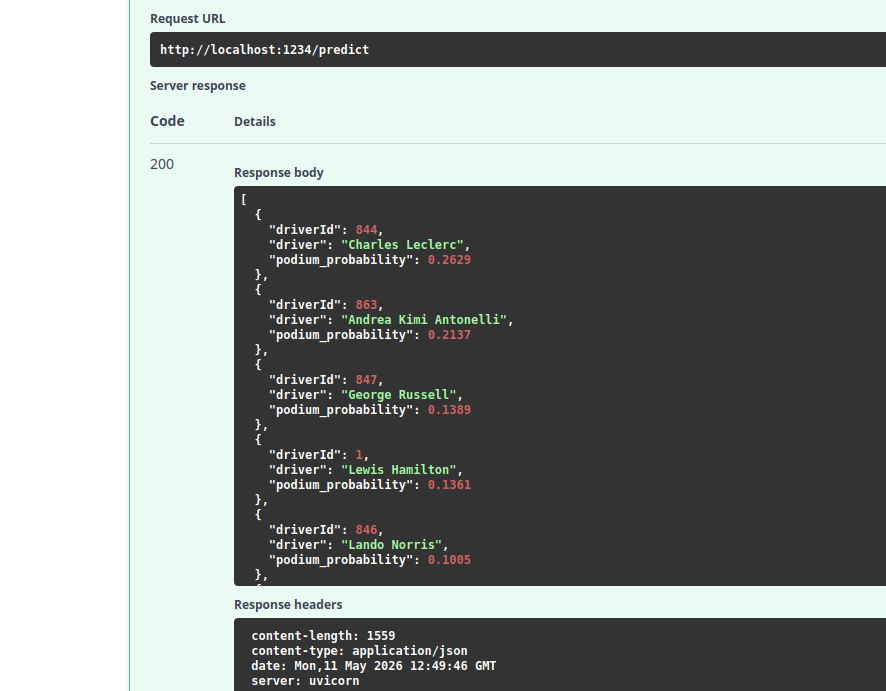
We can easily do better than this though, using Jinja2Templates we can throw together a simple HTML page with a bit of javascript on it that can call our API endpoint, and return the results in a nice way.
@router.get("/predict")
async def get_predict(request: Request):
  logger.info("HIT: GET /predict - serving UI")
  return templates.TemplateResponse(request, "home.html")

...

form.addEventListener('submit', async (e) => {
e.preventDefault();

const year  = parseInt(document.getElementById('year').value);
const round = parseInt(document.getElementById('round').value);

btn.textContent = 'Computing…';
btn.classList.add('loading');
out.classList.remove('visible');
out.innerHTML = '';

try {
  const res = await fetch('/predict', {
    method: 'POST',
    headers: { 'Content-Type': 'application/json' },
    body: JSON.stringify({ year, round })
  });

  if (!res.ok) throw new Error(`Server returned ${res.status}`);

  const drivers = await res.json();
Once we throw in a little sprinkle of CSS as well to make it look nicer, we get something that looks really good.
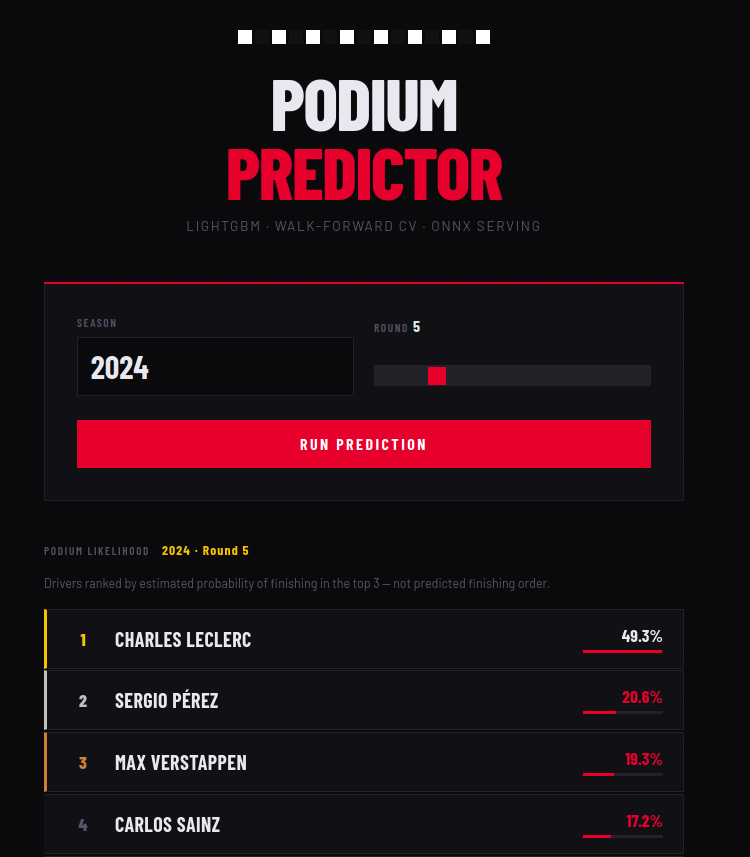
It's nice that we can now run this with a simple command, but how do we get this on a server such that people can interact with it? Deploying python directly is still sort of a pain even in 2026...
Shipping the goods
Answer: It's docker again.
FROM python:3.12-slim

WORKDIR /app

COPY pyproject.toml ./

# Copy over the source
COPY src ./src

# Install runtime deps + your package (no test/dev extras)
RUN pip install --no-cache-dir --upgrade pip \
 && pip install --no-cache-dir -e ".[serv,data]"

EXPOSE 1234
CMD ["f1_serve"]
When we wired up our config stuff before, the good thing is that we can now just push those straight through on the server in the run command, so we build our image like this:
docker build --file Dockerfile.serve --tag f1-podium-predictor:latest .And then we can run it like this:
docker run --name f1-podium-predictor -d -p 8080:1234 \
  -e LAKEFS_HOST=http://host.docker.internal:8000 \
  -e LAKEFS_INSTALLATION_ACCESS_KEY_ID=[your key] \
  -e LAKEFS_INSTALLATION_SECRET_ACCESS_KEY=[your secret] \
  -e MLFLOW_TRACKING_URI=http://host.docker.internal:5000 \
  -e MLFLOW_EXPERIMENT_NAME=f1-podium-predictor \
  f1-podium-predictor:latest
That's it! We've got the whole thing now, our workflow looks like this if we want to retrain a model/serve it:
- Push a new commit into LakeFS if we want to train on modified data
- Run the `f1_train` command to train a new model
- If we like the model, we can promote it by changing the alias on the model to be the `champion`
- Restart the app to trigger the model fetch of the new version
Next time...
We've got a fully serving model now that customers can interact with, that's great yes. And it works today, but what about tomorrow, or a month from now?
MLOPs is different from traditional software engineering that not only do we have the maintain the state of something as it is, but we constantly have to shift to a moving target.
- Dominant constructor eras can change or end
- New regulations can change who is competitive
- A new large group of rookies can drastically change effectiveness of rolling features especially if they perform well
So in summary our job isn't done just because we've shipped.
Next time we'll talk about Evidently which we'll be using for drift detection, monitoring, and talk about how we'll manage things like automation of our training.